🧱 组件 · 通信 · 生命周期
组件是"可复用的 UI 单元"。本节对比三框架在 Props 传入、事件回传、双向绑定、插槽/children、跨层传递、生命周期 上的写法与差异。
一、基础:定义与注册组件
<!-- Child.vue -->
<script setup>
const props = defineProps({ title: String })
</script>
<template><h3>{{ title }}</h3></template>
<script>
export default {
  props: { title: String }
}
</script>
<template><h3>{{ title }}</h3></template>
export function Child({ title }) {
  return <h3>{title}</h3>
}
二、核心:父传子(Props)与子传父(事件)
<!-- 父 -->
<Child :count="count" @change="count = $event" />
<script setup>
const count = ref(0)
</script>

<!-- 子 -->
<script setup>
const props = defineProps(['count'])
const emit = defineEmits(['change'])
</script>
<template>
  <button @click="emit('change', props.count - 1)">-</button>
</template>
<!-- 父 -->
<Child :count="count" @change="count = $event" />
<!-- 子 -->
<script>
export default {
  props: ['count'],
  methods: { dec() { this.$emit('change', this.count - 1) } }
}
</script>
<template><button @click="dec">-</button></template>
// 父
function Parent() {
  const [count, setCount] = useState(0)
  return <Child count={count} onChange={setCount} />
}
// 子:通过 props 回调把新值"还"给父
function Child({ count, onChange }) {
  return <button onClick={() => onChange(count - 1)}>-</button>
}
范式差异
- Vue 把"子→父"做成显式事件(
emit),语义清晰、可追踪。 - React 没有"事件"概念,子组件通过父传下来的回调函数(
onChange)把数据推回去——本质一样,只是形式不同。
三、核心:双向绑定(v-model vs 受控组件)
<Input v-model="name" />
<!-- 子组件 -->
<script setup>
const props = defineProps(['modelValue'])
const emit = defineEmits(['update:modelValue'])
</script>
<template>
  <input :value="props.modelValue"
         @input="emit('update:modelValue', $event.target.value)" />
</template>
function Input({ value, onChange }) {
  return <input value={value}
                onChange={e => onChange(e.target.value)} />
}
// 使用:<Input value={name} onChange={setName} />
本质一致
v-model 就是 :value + @input 的语法糖;React 受控组件就是"值 + onChange" 的显式写法。Vue 帮你藏了细节,React 让你手写每一步(更可控,也更易出错)。
四、核心:插槽 / Children(内容分发)
<!-- 父 -->
<Card><template #header>标题</template>正文</Card>
<!-- 子 -->
<template>
  <header><slot name="header" /></header>
  <main><slot /></main>
</template>
function Card({ header, children }) {
  return <div><header>{header}</header><main>{children}</main></div>
}
// 使用:<Card header="标题">正文</Card>
五、高级:跨层传递(避免 prop drilling)
// 祖先
provide('theme', ref('dark'))
// 后代(任意深层)
const theme = inject('theme')
const ThemeCtx = createContext('dark')
// 祖先
<ThemeCtx.Provider value="dark">{children}</ThemeCtx.Provider>
// 后代
const theme = useContext(ThemeCtx)
两者共性陷阱
跨层状态变化都会让所有消费组件重渲染。React 可用 useMemo/拆分 Context 优化;Vue 3 可把 provide 的值设为 ref/reactive 以精准追踪。
六、核心:生命周期对照
生命周期描述「组件从创建 → 挂载 → 更新 → 卸载」的完整过程。三框架的阶段顺序一致,但命名与 API 风格不同:Vue 2/3 用「钩子函数」,React 类组件用「生命周期方法」,React 函数组件用 Hooks(
useEffect)+ 依赖数组来描述「挂载/更新/卸载」。
6.1 生命周期钩子对照总表(官方级)
| 生命周期阶段 | Vue 2(Options) | Vue 3(Composition / Options) | React(类组件 / Hooks) |
|---|---|---|---|
| 创建 / 初始化 | beforeCreate → created |
setup()(取代 beforeCreate/created) |
constructor() / 函数体执行;useState 初始化 |
| 挂载前 | beforeMount |
onBeforeMount |
render()、getDerivedStateFromProps() |
| 挂载完成(可访问 DOM) | mounted |
onMounted |
componentDidMount / useEffect(fn, []) |
| 更新前 | beforeUpdate |
onBeforeUpdate |
shouldComponentUpdate、getDerivedStateFromProps |
| 更新后 | updated |
onUpdated |
componentDidUpdate / useEffect(fn, [deps]) |
| 卸载前 | beforeDestroy |
onBeforeUnmount |
componentWillUnmount / useEffect 清理函数 |
| 卸载后 | destroyed |
onUnmounted |
—(清理函数已执行,无对应钩子) |
| 缓存组件 激活 / 停用 | activated / deactivated |
onActivated / onDeactivated |
—(<KeepAlive> 无直接对应) |
| 错误捕获 | errorCaptured |
onErrorCaptured |
componentDidCatch / getDerivedStateFromError |
| 派生状态 / 计算属性 | computed |
computed |
getDerivedStateFromProps / useMemo |
| 监听数据变化 | watch / $watch |
watch / watchEffect |
useEffect(fn, [deps]) |
| 同步 DOM 副作用 | —(用 updated + nextTick) |
onUpdated + nextTick |
useLayoutEffect(提交后同步执行) |
三组关键差异
- Vue 3 用
setup()一次性替代了beforeCreate/created——响应式状态、计算、侦听、生命周期钩子都在setup内同步注册。 - Vue 2 的
beforeDestroy在 Vue 3 中更名为beforeUnmount,destroyed→unmounted(语义更贴近「卸载」而非「销毁」)。 - React 没有显式的「更新后」钩子,而是用
useEffect(fn, [deps]):依赖数组变化即代表「本次更新后」;[]等价于「仅挂载后」;返回的清理函数等价于「卸载前 / 下次更新前」。
6.2 官方生命周期流程图对比
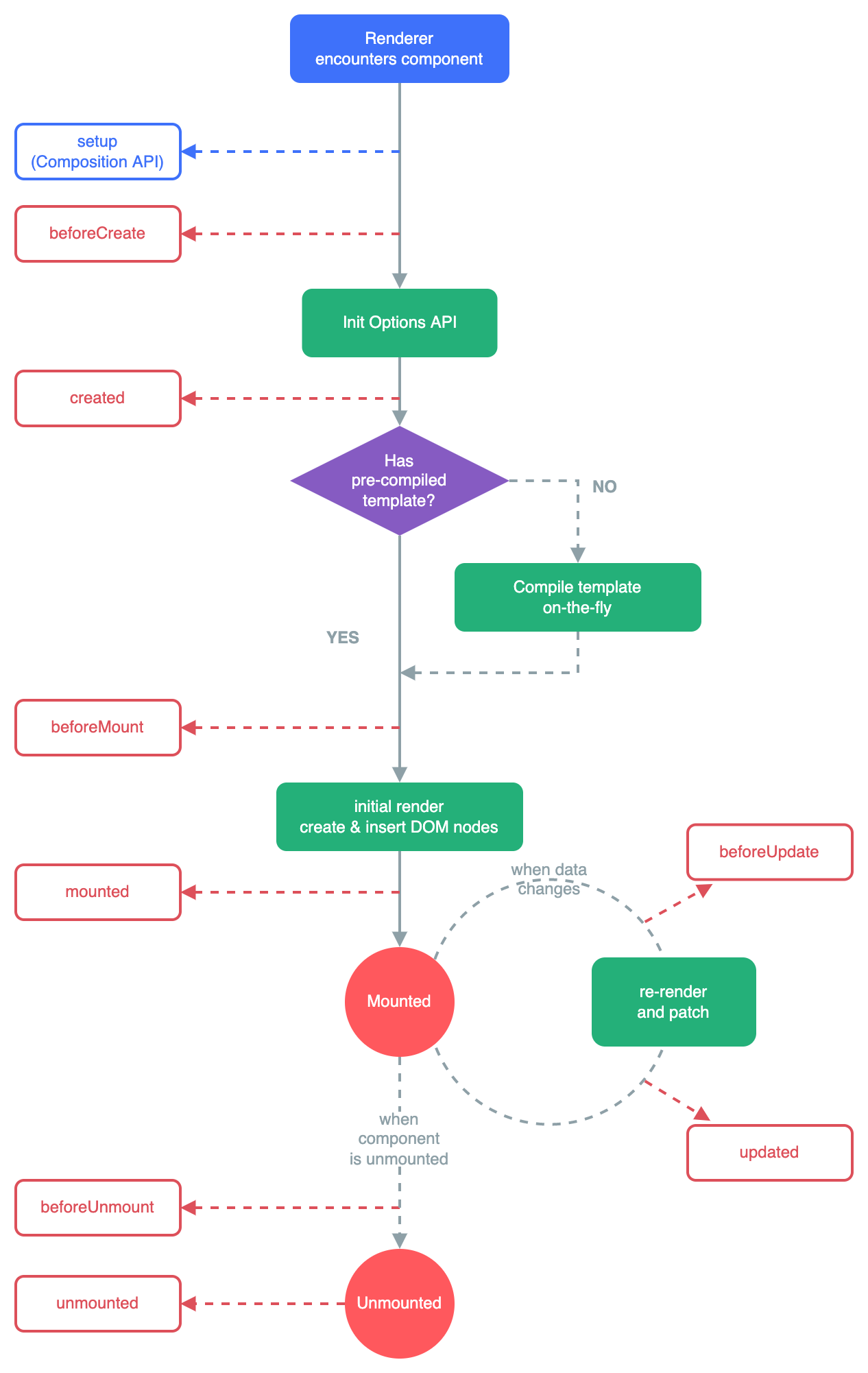
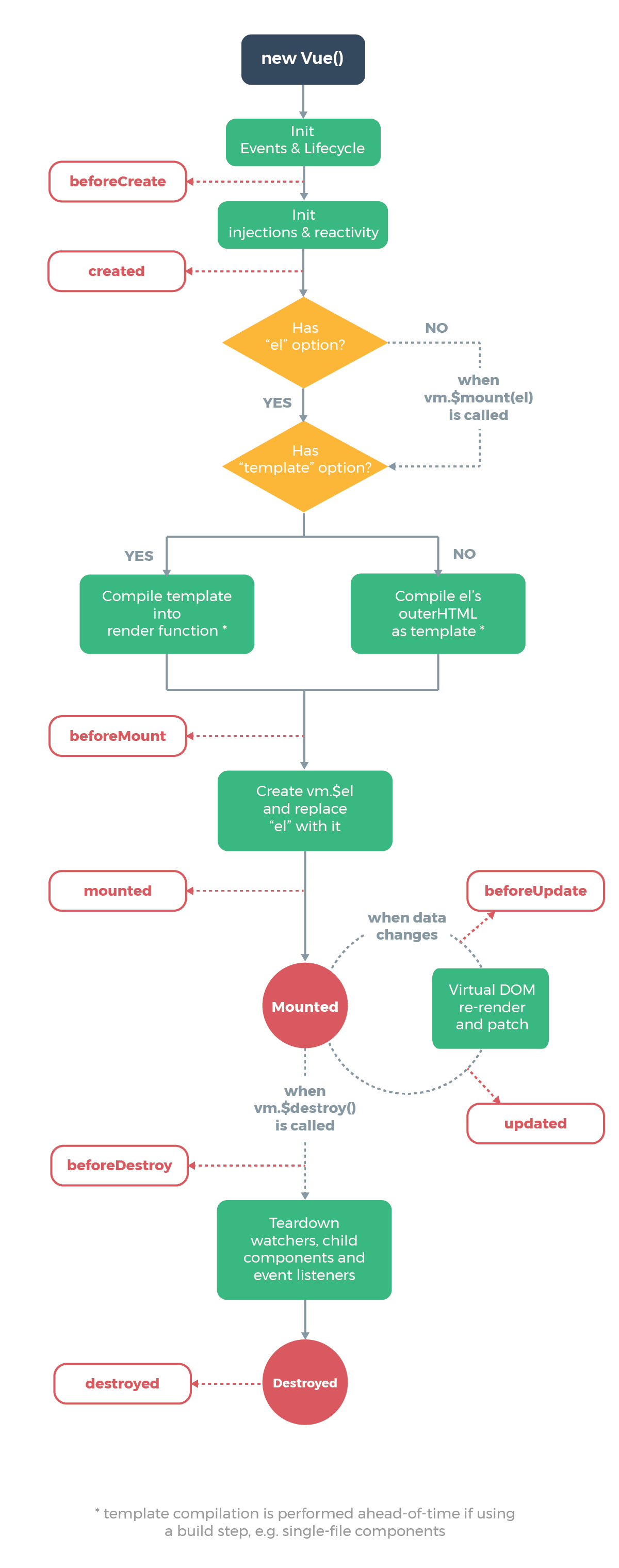
下面三张图均直接取自各框架官方文档(React 取其社区权威生命周期对照图),可对照查看同一「创建→挂载→更新→卸载」过程在三框架中的节点命名与走向。
Vue 3 官方生命周期图
Vue 2 官方生命周期图
React 官方生命周期图(类组件)
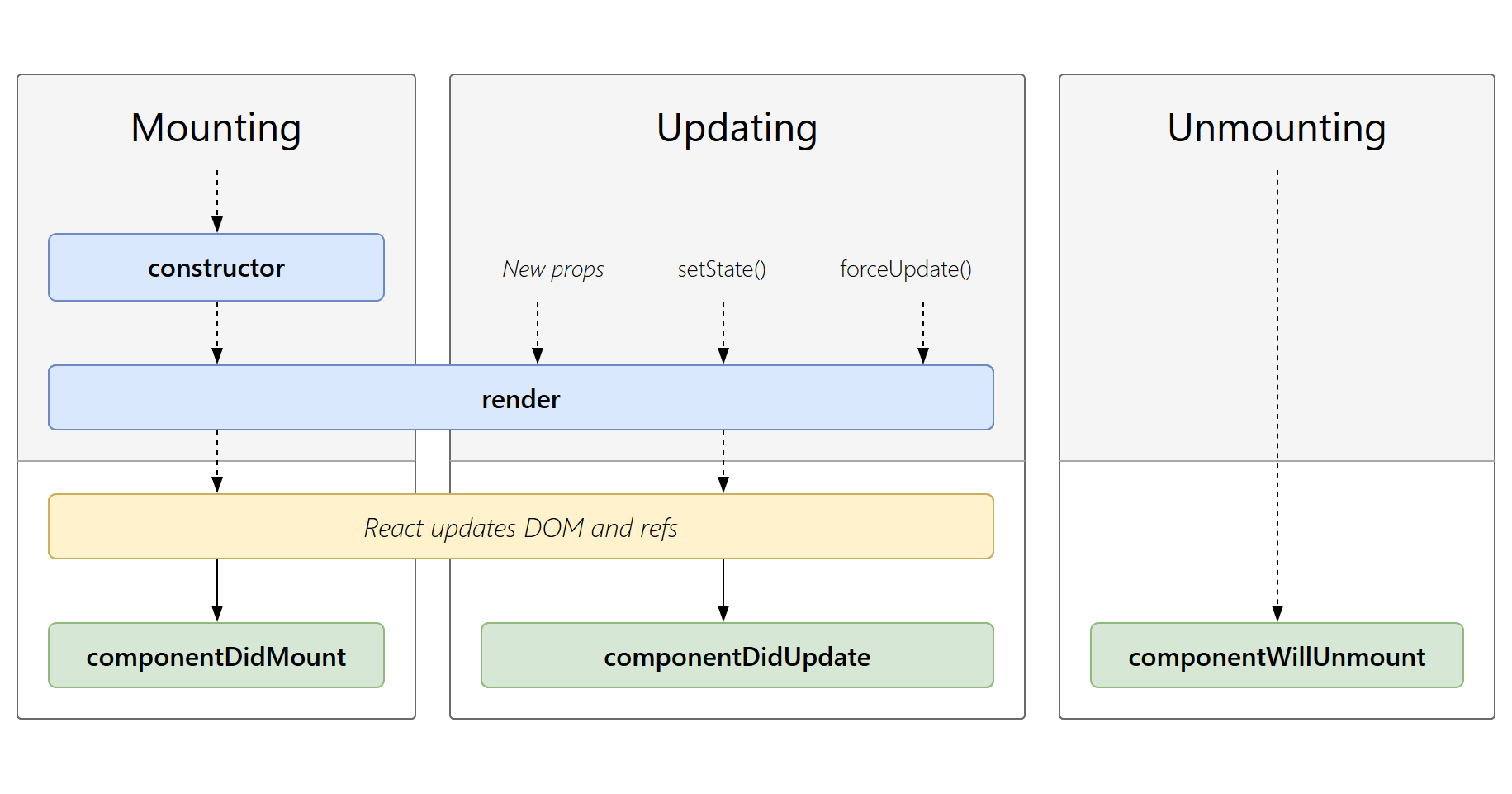
来源:React 生命周期方法对照图(wojtekmaj),React 社区广泛使用的权威对照图。
React 生命周期:新版(Hooks)vs 旧版(类组件)
上图(wojtekmaj)是 React 旧版(类组件) 的生命周期方法全景;React 新版(函数组件 + Hooks,自 16.8 引入,当前最新为 React 19) 已无「生命周期方法」概念,改用 Hooks 描述同一过程:
| 阶段 | 旧版(类组件方法) | 新版(函数组件 + Hooks) |
|---|---|---|
| 初始化 state | constructor / this.state = {} |
useState / useReducer |
| 派生状态 | getDerivedStateFromProps |
在渲染中直接计算 / useMemo |
| 渲染 | render() |
函数组件返回值(JSX) |
| 挂载后副作用 | componentDidMount |
useEffect(fn, []) |
| 是否重渲染 | shouldComponentUpdate |
React.memo / 默认浅比较 |
| 更新后副作用 | componentDidUpdate |
useEffect(fn, [deps]) |
| DOM 提交后同步副作用 | getSnapshotBeforeUpdate / componentDidUpdate |
useLayoutEffect |
| 卸载前清理 | componentWillUnmount |
useEffect 返回的清理函数 |
| 错误边界 | componentDidCatch / getDerivedStateFromError |
仍只能用类组件(Hooks 无等价 API) |
- React 19 进一步强化 Hooks 模型:
use可在渲染中读 Promise/Context、useOptimistic做乐观更新、useActionState/useFormStatus简化表单与 Server Actions。 - 结论:新项目优先用函数组件 + Hooks;错误边界或维护极老代码时才用类组件。
6.3 清理副作用(定时器 / 订阅)
在卸载 / 下次更新前释放资源
import { onMounted, onBeforeUnmount } from 'vue'
let timer
onMounted(() => { timer = setInterval(fn, 1000) })
onBeforeUnmount(() => clearInterval(timer))
useEffect(() => {
  const timer = setInterval(fn, 1000)
  return () => clearInterval(timer) // 清理函数:卸载前 / 依赖变化前执行
}, [])
export default {
  mounted() { this.timer = setInterval(fn, 1000) },
  beforeDestroy() { clearInterval(this.timer) }
}
七、可运行 Demo(代码 + 实时预览)
7.1 待办列表(列表渲染 / 事件 / 表单绑定)
7.2 生命周期与副作用
八、真实业务场景
场景 A:Modal 弹窗(挂载/卸载 + 跨层关闭)
- Vue:用
<Teleport to="body">+v-if控制挂载;关闭事件emit('close')。 - React:条件渲染
{open && <Modal/>};关闭通过onClose回调。 - 共性:都需在卸载时清理事件监听 / 定时器(见第六节清理函数)。
场景 B:列表项删除(key 的重要性)
// React:务必给稳定 key,否则 Diff 错位
{list.map(item => <li key={item.id}>{item.text}</li>)}
<!-- Vue:同理 -->
<li v-for="item in list" :key="item.id">{{ item.text }}</li>
踩坑清单
- Vue2:
props是单向数据流,子组件不要直接改 props(会警告);要用data或computed拷贝。 - Vue3:
defineProps返回的是只读代理,解构会丢失响应性 → 用toRefs(props)。 - React:
props变化但组件未重渲染?检查是否被React.memo包裹且引用未变;回调要用useCallback稳定。 - 通用:列表
key不要用数组下标(重排会出错),用稳定唯一 id。